YouTube Bonanza for Airtel Users in India

Starting today, all IPL T20 cricket matches will be streamed live on YouTube (youtube.com/ipl)  and since there aren’t any geographic restrictions, cricket fans around the world can watch matches of their favorite teams on any computer (or an Internet connected TV) for free without having to pay for premium cable channels.

YouTube will live telecast every single IPL cricket match for the next 43 days. If there are no glitches, this IPL season will clearly go down in history books as the largest sporting event ever that was streamed live on the Internet worldwide.

If you have an Airtel Broadband connection in India but it isn’t fast enough for watching streaming web videos, here some good news.

Airtel will automatically upgrade the broadband plan of all customers to a speed of 2 Mbps during the entire duration of the IPL tournament without you having to do anything. That means no more “buffering ..” messages while watching live cricket videos on your computer.

Is the Airtel Broadband Speed Upgrade free?

Airtel won’t charge you any fee for upgrading your existing plan to 2 Mbps and your Internet speed will automatically be downgraded to your existing plan after the IPL season is over.

However, there’s something you should know. When you are upgraded to 2 Mbps, the data transfer limit will still be governed by your current broadband tariff plan.

So while you can watch videos at higher speeds (and possibly higher resolutions) with your current plan, too much of IPL can quickly exhaust your data limits and then you’ll have to pay per byte which is often not very cheap.

Another point –  the upgraded speed of 2Mbps is applicable only for videos streamed via youtube.com/ipl and not for any other site on the Internet.


Turn your Images into Spreadsheet Art

This time-lapse video captures how the Google Docs team turned an online spreadsheet into sort of a painting canvas by filling individual cells of the sheet with different colors simultaneously.

It might have take them several days to plan and draw the whole thing but luckily, you get to enjoy the process in under 60 seconds.

How to Paint in an Excel Spreadsheet?

If you want to create your own spreadsheet art but don’t have the time (or patience) to carefully paint every single square cell manually, here’s a nice shortcut.

Go to boydevlin.com and download their free Excel Art program. It’s a standalone utility that will convert any bitmap image into a spreadsheet that you then open in Microsoft Excel or even Google Docs. You don’t need Excel to use Excel art.

Excel Spreadsheet Mosaic

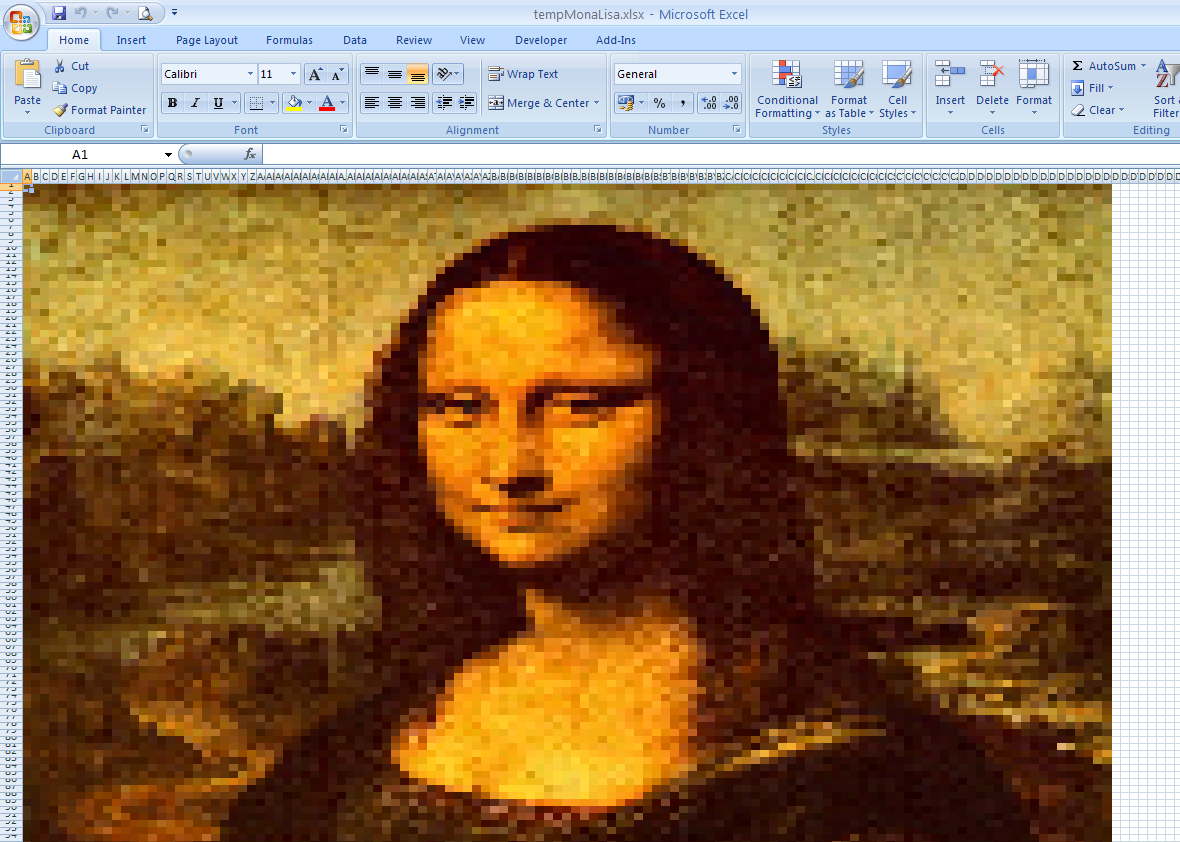
Excel as a Pixel Drawing Tool

For instance, here’re pixel portraits of painter Vincent van Gogh (Google Docs) and Mona Lisa all created with Excel Art. The conversion might appear a little pixelated from close but its beautiful nonetheless.

Thanks Richard Devlin for the tip.

Turn your Images into Spreadsheet Art

The New MSN.com Homepage

msn.com homepage

Microsoft is slowly rolling out a new design for their MSN.com homepage. The design is clean and doesn’t appear busy anymore.

Like Yahoo, you can check your friend’s tweets and their Facebook status updates right on the MSN page. You can even update your status without leaving the homepage.

Visit msn.com to see if the new design is live for you and if it’s not, just head over to msn.com/preview. They have created a new butterfly logo for the MSN logo as well.

msn logo with butterfly

Windows 7 Taskbar Thumbnail Customizer Tweaks, Enlarges Your Superbar Thumbnails

Windows 7: Hailing from the camp of "software that does exactly what its name implies", Windows 7 Taskbar Thumbnail Customizer fine-tunes the size, spacing, and margins of your Windows 7 Superbar previews.

If you're unhappy with the size and spacing of application and folder thumbnails on your Superbar (less enthusiastically dubbed the taskbar in some circles), Windows 7 Taskbar Thumbnail Customizer adjusts them. Vertical size, spacing between the icons, and margins on the top and bottom of the icons are among the parameters awaiting your obsessive attention. This application won't change the spacing of icons on the actual bar itself, it alters the size and spacing of the preview thumbnails.

See the two images below for comparison. The top is the default settings and the second is with the size of the thumbnail doubled to 400:

Don't worry about remembering your initial settings—if you're not happy with your Superbar's new look, hit "Restore Defaults" and everything will return to its default. Have another application or trick for customizing your Windows interface? Let's hear about it in the comments. Thanks Saudrapsmann!

7 Taskbar Thumbnail Customizer [Deviant Art via #Tips]

Which Social Websites are Good for your own Site?

Which Social Media Site?

Will Facebook help drive more traffic to your website or Twitter? Are incoming links from Digg more valuable for improving your site’s organic rankings than than from YouTube or Flickr? Which is the best social site for engaging with people who are already in love with your brand?

For answers and ideas, check this handy chart (PDF) from cmo.com that compares the benefits of sharing content on various social media websites and whether they are worth your time or your (limited) social media marketing budget.

Some of the points mentioned in the chart aren’t valid anymore like your site won’t derive any SEO benefits from Flickr or delicious.com as they nofollow all external links. On the other hand, Facebook has a huge potential for driving traffic especially if you have a public page (example) that is indexed by search engines.

Thanks Steven Finch for the tip.

Which Social Websites are Good for your own Site?

Originally published at Digital Inspiration by Amit Agarwal.

Facebook Twitter Technology Blog