Build a Cooling Pad for your Laptop

laptop cooling padsEeshan Chatterjee was looking for a cooling pad to prevent his laptop from overheating. Being a student, he didn’t have the budget for a readymade cooling pad so he decided to create one on his own using some cardboard pieces and a USB fan.

Eeshan inserted thermocol pieces at the edges to adjust the height of the cardboard according to the fan. Now the continuous circulation of air below the laptop prevents the machine from heating up.

Here are some pictures of Eeshan’s home-made laptop cooling pad.

Laptop Stand Made of Cardboard

Cooling with a USB Fan

Laptop Cooling Pad - Side View

Build a Cooling Pad for your Laptop

PayPal Problems in India Aren’t Over Yet!

PayPal IndiaPayPal has around 175,000 users in India so it naturally became a big issue when PayPal had to temporarily suspend part of their operations here due to enquiries from Indian regulators.

The issue was resolved after about a month but users in India were no longer allowed to use the PayPal service for receiving personal payments. That’s because personal money transfer via PayPal falls in the category of “inward remittances” and PayPal probably doesn’t have the license to run a remittance service in India.

That said, professionals, businesses, freelancers, and other service provides are allowed, like before, to withdraw money from PayPal to their local bank accounts as long as they can submit the right purpose code at the time of the withdrawal.

It now however appears that PayPal’s India operations are still under the scrutiny of government and if they aren’t able to satisfy the regulators, be prepared for another disruption.

Alpana Killawala, who is the Chief General Manager at the Reserve Bank of India, told Jaimon Joseph the actual reason why PayPal had to temporarily stop transactions in India:

All money flowing across Indian borders is subject to two major laws. The Foreign Exchange Management Act (FEMA) and the Payments and Settlements Act of 2007. According to those laws, organizations like PayPal should have submitted themselves to scrutiny by the RBI. They hadn’t, so they were pulled up.

The Reserve Bank of India has now sent a detailed questionnaire to PayPal that they are expected to answer by April 30, 2010. If PayPal is unable to satisfy the regulators, Alpana says, “their operations could be disrupted again.”

You may dislike PayPal for their high transaction fees or because they have their own currency exchange rates, but the fact is that they are more or less a monopoly and there aren’t too many good PayPal alternatives in India yet.

I just hope this tussle between the RBI and PayPal get resolved soon and that the government makes it easy for other online payment services to enter and operate in India so that we have more choices.

YouTube Bonanza for Airtel Users in India

Starting today, all IPL T20 cricket matches will be streamed live on YouTube (youtube.com/ipl)  and since there aren’t any geographic restrictions, cricket fans around the world can watch matches of their favorite teams on any computer (or an Internet connected TV) for free without having to pay for premium cable channels.

YouTube will live telecast every single IPL cricket match for the next 43 days. If there are no glitches, this IPL season will clearly go down in history books as the largest sporting event ever that was streamed live on the Internet worldwide.

If you have an Airtel Broadband connection in India but it isn’t fast enough for watching streaming web videos, here some good news.

Airtel will automatically upgrade the broadband plan of all customers to a speed of 2 Mbps during the entire duration of the IPL tournament without you having to do anything. That means no more “buffering ..” messages while watching live cricket videos on your computer.

Is the Airtel Broadband Speed Upgrade free?

Airtel won’t charge you any fee for upgrading your existing plan to 2 Mbps and your Internet speed will automatically be downgraded to your existing plan after the IPL season is over.

However, there’s something you should know. When you are upgraded to 2 Mbps, the data transfer limit will still be governed by your current broadband tariff plan.

So while you can watch videos at higher speeds (and possibly higher resolutions) with your current plan, too much of IPL can quickly exhaust your data limits and then you’ll have to pay per byte which is often not very cheap.

Another point –  the upgraded speed of 2Mbps is applicable only for videos streamed via youtube.com/ipl and not for any other site on the Internet.


Turn your Images into Spreadsheet Art

This time-lapse video captures how the Google Docs team turned an online spreadsheet into sort of a painting canvas by filling individual cells of the sheet with different colors simultaneously.

It might have take them several days to plan and draw the whole thing but luckily, you get to enjoy the process in under 60 seconds.

How to Paint in an Excel Spreadsheet?

If you want to create your own spreadsheet art but don’t have the time (or patience) to carefully paint every single square cell manually, here’s a nice shortcut.

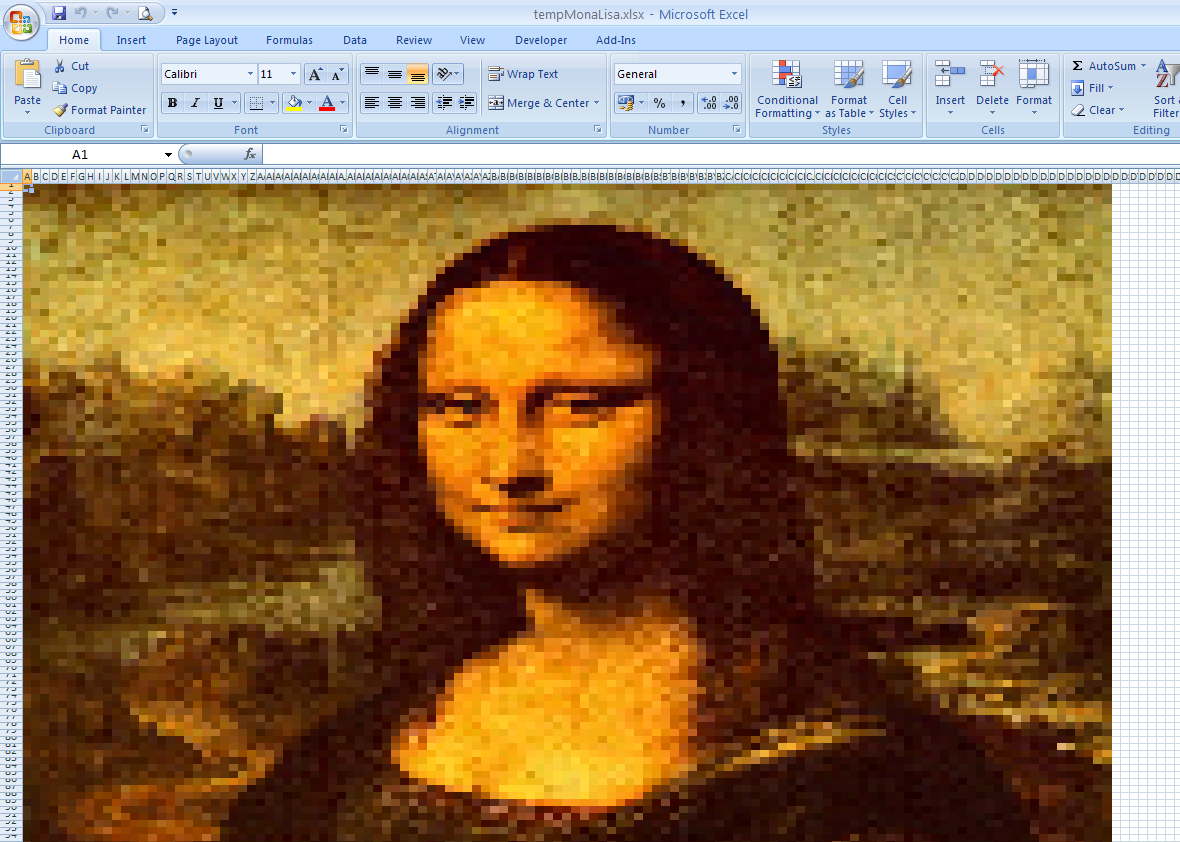
Go to boydevlin.com and download their free Excel Art program. It’s a standalone utility that will convert any bitmap image into a spreadsheet that you then open in Microsoft Excel or even Google Docs. You don’t need Excel to use Excel art.

Excel Spreadsheet Mosaic

Excel as a Pixel Drawing Tool

For instance, here’re pixel portraits of painter Vincent van Gogh (Google Docs) and Mona Lisa all created with Excel Art. The conversion might appear a little pixelated from close but its beautiful nonetheless.

Thanks Richard Devlin for the tip.

Turn your Images into Spreadsheet Art

The New MSN.com Homepage

msn.com homepage

Microsoft is slowly rolling out a new design for their MSN.com homepage. The design is clean and doesn’t appear busy anymore.

Like Yahoo, you can check your friend’s tweets and their Facebook status updates right on the MSN page. You can even update your status without leaving the homepage.

Visit msn.com to see if the new design is live for you and if it’s not, just head over to msn.com/preview. They have created a new butterfly logo for the MSN logo as well.

msn logo with butterfly